Templates
Ready-made workflows you start from. How the Templates page ranks suggestions for your organisation, what a template's variants are, and what using one creates.
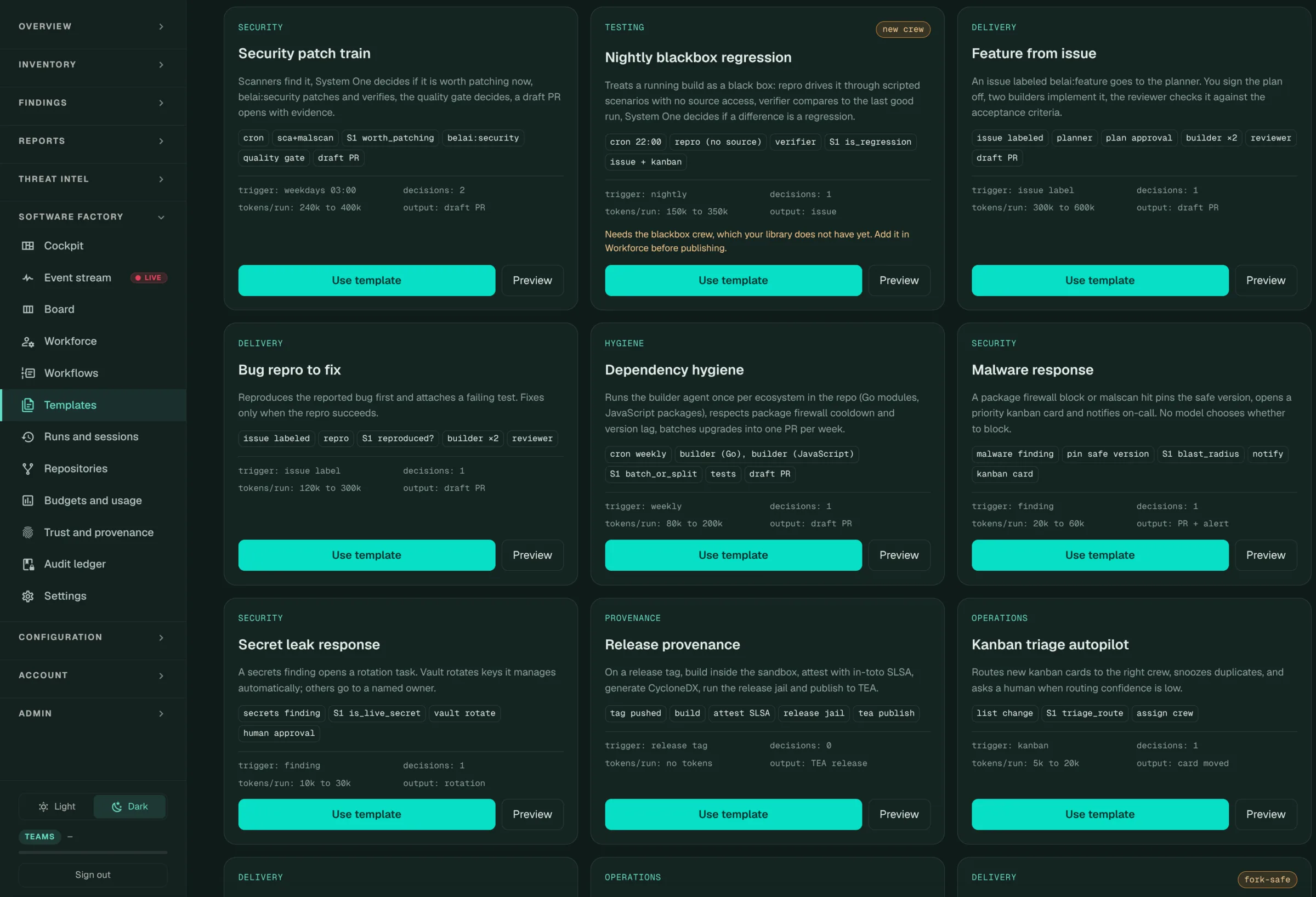
A template is a complete workflow (triggers, steps, limits) that passes the same strict checks as anything you publish. The Templates page (/resolve/factory-templates) lists them by category: Security, Testing, Delivery, Hygiene, Provenance and Operations. The template catalogue lists every one by id.
Using a template
Choose Use template on a template. It copies the template into a new workflow as draft version 1. Nothing runs until you publish it. You can set:
- a name, which also gives the workflow its slug
- the repositories in scope. Leave it empty to use the repository of each event. Using the template does not check them; a run started on a repository that is not managed is refused with
scope_unmanaged_repo. - a run token budget, to replace the template’s
Each card on the page shows the template’s flow (for example cron → sca+malscan → S1 worth_patching → belai:security → quality gate → draft PR), its trigger, how many decisions it makes, its token cost per run and its output. A new crew badge means it needs a crew your library does not have yet. The card names which.
Event templates
Most templates answer one event, for example a failed check run, a new pull request, a sf: label, a package seen for the first time, or a schedule. Each card carries:
| Field | Meaning |
|---|---|
| Event | The event it answers, such as check_run.completed, label:sf:fix-tests or package.first_seen |
| Source | github, package-firewall, ai-firewall, egress, schedule or finding |
| Variants | The axes it adapts along, such as package manager or test runner |
| Keywords | Extra words search matches |
| Writes tickets | Its agent files cards in the ticket standard |
| Priority | The trigger priority a workflow made from it starts with. Default 3. |
Variants
A template with variants is one workflow, not one per toolchain. The variant is picked from the repository’s profile each time the workflow runs.
| Axis | Values |
|---|---|
| Package manager | npm, pnpm, yarn, poetry, uv, pip-tools, go, gradle, maven, cargo, bundler, composer |
| Test runner | jest, vitest, pytest, go test, junit, rspec, cargo test, phpunit |
| Secret provider | aws, github, stripe, slack, private key, generic |
| Artifact | container, npm tgz, wheel, jar, go binary, cyclonedx, spdx |
How suggestions are ranked
The Templates page puts the templates that would do the most for your organisation first. The ranking runs in your browser on counts the factory keeps for the last 7 days:
- Unanswered events: GitHub deliveries no run answered, by event and action, and open firewall sightings that started nothing
- Ecosystems: packages your organisation has, per ecosystem
- Package managers: repositories per package manager, from their profiles
- Labels in use, such as
needs-info
Each suggestion gives its reason in a line, for example how many check failures last week went unanswered.
Dismiss hides a suggestion and remembers the count at the time. It comes back after 30 days, or once that count doubles. DELETE /v1/factory/templates/{id}/dismiss undoes a dismissal; the page has no undo control.
API
| Method | Path |
|---|---|
| GET | /v1/factory/templates?category= |
| GET | /v1/factory/templates/{id} (adds the graph and limits) |
| POST | /v1/factory/templates/{id}/use with {name, repos, limits} |
| GET | /v1/factory/templates/signals |
| POST, DELETE | /v1/factory/templates/{id}/dismiss |