Checkpoints and Needs you
One queue of everything that waits on a person. The eleven kinds of checkpoint, how rows are merged and ordered, what you can do from the page, and the cockpit's Needs you panel.
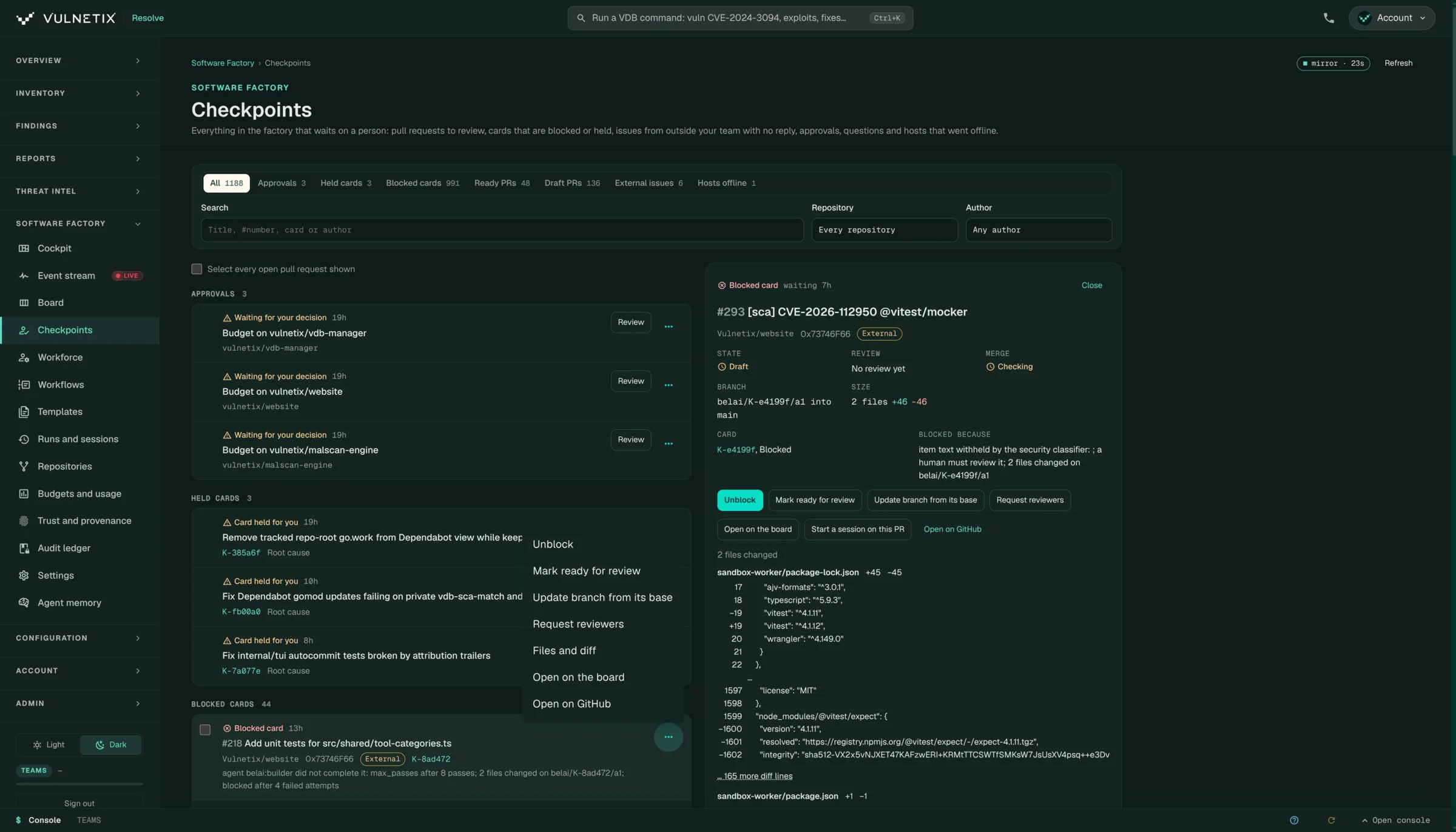
The Checkpoints page (/resolve/factory-checkpoints) is one queue of everything in the factory that waits on a person. The cockpit’s Needs you panel is the top of the same queue.
The eleven kinds
| Kind | Shown as | What is waiting |
|---|---|---|
approval |
Waiting for your decision | An approval |
question |
Question for you | An agent asked something and is waiting for the answer |
firewall_review |
Capability held for review | An AI capability (an MCP server, tool, skill or client) the AI Firewall holds for review while a caller waits. Review opens it on the AI Firewall page. |
card_held |
Card held for you | A card with a checkpoint:<reason> label that no agent will claim until a person clears it |
card_blocked |
Blocked card | A card in the blocked list |
card_confirm |
Card to confirm | A card an agent filed that a person should confirm |
pr_ready |
Pull request ready for review | An open pull request that is not a draft |
pr_draft |
Draft pull request | An open draft pull request |
issue_external |
Issue with no reply from your team | An open issue from someone outside the team, with no reply from the team |
claim_lapsed |
Claim lapsed | An agent’s claim on a card ran out |
host_offline |
Host offline | A host that runs workers stopped reporting in the last 24 hours |
How rows are merged
A pull request or issue linked to a card is shown as one row for the card, with the pull request or issue folded in. A row that is several kinds at once shows its most urgent kind, in this order: approval, question, firewall_review, card_held, card_blocked, card_confirm, pr_ready, pr_draft, issue_external, claim_lapsed, host_offline. Within a kind, the newest rows come first.
It covers the repositories your GitHub App installations reach, those attached to your Pix Sandboxes, and those your boards are bound to.
Filtering
The kind filter shows each kind that has rows, with counts. You can also filter by repository and text, and narrow the loaded rows by author. An author is marked External when their association with the repository is not owner, member or collaborator. Bots are never external.
What you can do
| Row | Actions |
|---|---|
| Pull request | Mark ready, convert to draft, update branch, request reviewers. Up to 50 at once from the bulk bar. Start a session on it in the Pix Sandbox that has the repository. |
| Conflicting pull request | Resolve conflicts files a merge conflict card, or opens the one already filed. The inspector shows its attempts. |
| Card | Unblock (moves it to backlog with a note), Approve, Reject (blocks it with your reason), open it on the board |
| Issue | Open on GitHub, or File a card for it and link the two |
| Waiting item | Go to the run, session, card or host |
Changes that move a card, file one or request reviewers open a confirm under the row first. The pull request actions use the GitHub App and show their price.
The page reloads when the event stream reports card, GitHub or approval events.
Needs you on the cockpit
The cockpit shows the head of the queue, plus merge conflicts and any signing keys that dropped off GitHub. Its footer links here with the kinds it showed.
API
| Method | Path |
|---|---|
| GET | /v1/factory/checkpoints?kind=&repo=&q= |
| GET | /v1/factory/needs (the cockpit’s list) |
| POST | /v1/factory/checkpoints/pulls (pull request actions, up to 50 targets) |
| POST | /v1/factory/checkpoints/conflicts with {repo, number} |